
If you have ever stared at your banking app and thought, “Cool, my rent is due… and my paycheck is still five days away,” you are not bad with money. You are dealing with a timing problem.
I lived in that exact stress loop in my twenties. My bills were not outrageous, but the due dates were stacked in the first half of the month, and I got paid later. The fix was not “try harder.” The fix was building a bill calendar that shows, in plain sight, what has to be funded before the next paycheck hits.
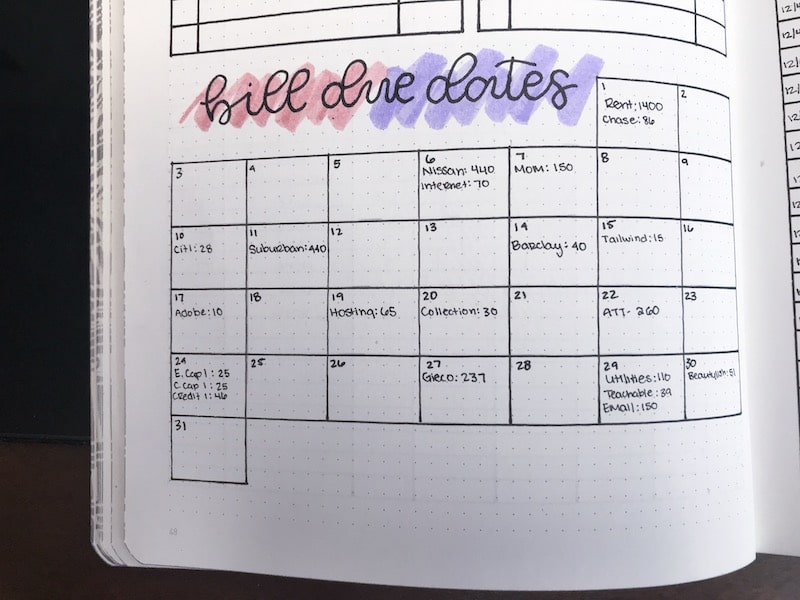
What a bill calendar does
A bill calendar is a one-page view of:
- Your paydays (not your budget period in theory, the real deposit dates)
- Bill due dates (the day the company considers it on time)
- Payment timing (when money must leave your account to arrive by the due date)
- The “between paycheck” balance you must protect so early due dates do not eat grocery money or trigger overdrafts
When due dates fall before payday, the calendar’s job is simple: show you what needs to be sitting in your account before you get paid again.
Step 1: List paydays first
Open your calendar app or grab paper and write down every payday for the month. Include the day it actually hits your account, not when payroll “sends” it.
Two quick reality checks:
- If payday falls on a weekend or holiday, your deposit may come early or late depending on your employer and bank. Look back at the last few months and use what really happened.
- If you are paid biweekly, some months have three checks. Mark that clearly because it is a great chance to catch up or build a buffer.
Step 2: Add every due date
Now list bills in one consistent format:
- Name (Rent, Car Payment, Electric, Internet, Credit Card)
- Amount (use the typical amount for variable bills)
- Due date
- How you pay (autopay, ACH, debit card, mailed check, bank bill pay)
For variable bills (utilities, gas), you are not trying to be perfect. Put your “safe average” and adjust once the real bill arrives.
One quick clarity point that saves a lot of confusion: for credit cards, you are planning around the payment due date and your payment send date, not your statement closing date.
Step 3: Add processing time
This is the sneaky part. A bill can be “due” on the 5th, but the money might need to leave your account on the 2nd.
Timing varies by bank, biller, and cutoffs, so treat these as starting points and confirm what your accounts actually do.
Rules of thumb
- Bank bill pay by mailed check: schedule 7 to 10 days early (more if you have seen delays before)
- Bank bill pay electronic: commonly 1 to 3 business days early (check your bank’s delivery estimate)
- ACH autopay (pulled by the biller): commonly drafts 0 to 3 business days before the due date, but some pull earlier; check the draft date history in your bank transactions
- Debit card payment: often shows up quickly, but posting times and cutoffs vary; do not rely on “same day” if your balance will be tight
- Credit card minimums: pay 2 to 3 days early, more if you have ever gotten a “processing delay” message
On your calendar, write two dates for each bill when it matters:
- Send date (when you initiate, or when autopay drafts)
- Due date
If you only write down the due date, you can still get surprised by timing.
Step 4: Find your must-stay balance
This is my favorite stress reducer because it turns the vague fear of overdrafting into one number.
How to find it
Look at the span between two paydays and total every bill whose send date falls in that span.
That total is the minimum amount that must remain available in your checking account (or in a bills sub-account) until the next payday.
If your checking balance drops below your must-stay number, you are borrowing from bills. That is when people end up scrambling, swiping credit cards for groceries, or paying late fees even though they “make enough.”
Claire rule: If you use autopay, assume the bill will pull at the worst possible time, then fund it anyway. Autopay is only stress-free when the money is already parked and waiting.
Example calendar
Here is an example month for someone paid twice monthly on the 10th and 25th.
Example: Bills and timing
- Rent: $1,200 due 1st (paid by ACH transfer you initiate, send 2 business days early)
- Car payment: $310 due 4th (biller autopay ACH, drafts a couple business days early)
- Electric: $140 due 6th (pay online, send 1 day early)
- Internet: $70 due 8th (autopay, may draft 1 to 2 days early)
- Credit card minimum: $65 due 15th (pay 3 days early)
- Phone: $55 due 21st (autopay, may draft a couple days early)
Example: Calendar view
Paydays: 10th and 25th
- 25th payday arrives
- 28th: Car autopay may draft early for the 4th (fund $310)
- 29th: Rent send date for the 1st (fund $1,200)
- 5th: Electric send date for the 6th (fund $140)
- 6th or 7th: Internet autopay may draft early for the 8th (fund $70)
- 10th payday arrives
- 12th: Credit card send date for the 15th (fund $65)
- 19th: Phone autopay may draft early for the 21st (fund $55)
- 25th payday arrives
Must-stay balance between the 25th and the 10th:
Car $310 + Rent $1,200 + Electric $140 + Internet $70 = $1,720
That means on the 25th, you can absolutely buy groceries, fill your gas tank, and live your life. But you only do it after you have protected that $1,720 from being accidentally spent. The calendar makes that visible.
How to use it weekly
Pick one review day
Mine is Sunday evening. I look at the next 10 days and ask:
- What payments are scheduled to leave my account?
- Do I have the must-stay balance protected?
- Did any variable bill come in higher than expected?
Use one visual cue
On paper, I like:
- Circle paydays
- Underline send dates
- Box due dates
Digitally, you can do the same thing with three different calendar colors.
When to change due dates
If you are constantly paying bills “late-ish” because they fall before payday, a due-date change is not a loophole. It is a normal customer service request.
It works especially well for:
- Credit cards
- Auto loans
- Personal loans
- Some utilities and phone providers
- Subscriptions you control
Not every lender or provider allows changes, and some limit how often you can do it, but it is worth asking.
Rent is less flexible, but you can sometimes negotiate a different due date if you have a strong payment history, or you can ask about a grace period policy in writing.
How to ask safely
This is the part people are rightly nervous about. The transition month can be weird, and weird is where late fees happen. Here is the safe way to do it.
1) Call or chat
Use a simple script:
“Hi, I get paid on the 10th and 25th. I’d like to move my due date to the 12th (or 15th) so I can pay on time consistently. Can you tell me what my next payment date would be during the switch and whether any interest or proration applies?”
2) Ask these questions
- What will my next due date be? (Get the exact date.)
- Will there be a short bill period or a skipped month? (Some lenders extend the cycle; others create a shorter cycle.)
- What amount will be due during the transition? (Sometimes it is the usual amount, sometimes prorated.)
3) Confirm autopay behavior
If you have autopay turned on, ask:
- Will autopay automatically adjust to the new date?
- Will it draft once or twice during the transition window?
- Should you temporarily turn autopay off and make one manual payment instead?
There is no one-size answer. The goal is to prevent a double draft or a missed draft.
4) Get it in writing
Ask for an email confirmation or a message in your account inbox. Then take a screenshot for your records. If a late fee shows up later, documentation is your best friend.
Handle the transition month
For the month you switch due dates, treat the bill like it is “high risk” and put extra reminders around it.
Add three entries
- One week before: “Due date change check”
- New send date: when you will pay (or when autopay should draft)
- Two days after: “Verify payment posted”
Verification matters because sometimes the change goes through, but autopay does not update as expected. A two-minute check saves you a late fee and a customer service spiral.

Two small upgrades
Keep a small buffer
If you can build even a $200 to $500 cushion in checking, early due dates stop feeling like ambushes. This is not an emergency fund replacement. It is a timing pad so your calendar is easier to follow.
Try a separate Bills account
One checking for spending, one for bills can be a game changer if you are the kind of person who sees money and spends it. Your bill calendar tells you what to transfer into your Bills account after each payday, and autopay drafts only from that account.
One safety check: make sure every autopay is pointed at the account you intend, and understand how overdraft or linked-account transfers work at your bank. A separate Bills account is only calming if it does not create surprise transfers or fees.
Common mistakes
- Only tracking due dates: processing time is real life.
- Assuming autopay drafts on the due date: many billers draft earlier, and some draft exactly on time. Confirm the pattern.
- Forgetting weekends and holidays: they change deposit timing and processing timing.
- Changing due dates without clarifying the transition: this is where accidental late payments happen.
- Not protecting the must-stay balance: you end up “robbing” bills for groceries and then paying for it later.
Quick FAQ
Should I pay bills early?
If paying early means you will not have enough for essentials, do not just randomly “pay early.” Use the calendar to decide which paycheck funds that bill. Then protect that money so it is still there when the payment needs to go out.
What if I cannot move the due date?
Then the calendar becomes even more important. Fund that bill from the previous paycheck and treat it as already spent. If it is rent or a loan that will not budge, prioritize building a small buffer so the timing stops squeezing you.
What if I have irregular income?
You can still use a bill calendar. Instead of anchoring to fixed paydays, anchor to expected deposit windows and keep bill funding in a holding category or separate account. Your must-stay balance becomes “must-stay until the next deposit clears.”
Your next move
Tonight, do the five-minute version: write your next two paydays, then write every bill that must be sent before the next payday hits. Total it. That number is your must-stay balance.
Once you see the timing clearly, the shame melts away. It is not that you are failing. Your bills are just crowding your paycheck. A bill calendar gives you your breathing room back.
This article is for organizational and educational purposes, not financial or legal advice.